
Infront Advisory Solution

Open favourites

AS_market_data_logo_DE.png

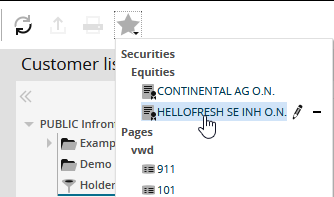
AS_icon_watchlist_context_menu_DE.png   You can find your favourite securities and pages at any time by clicking the "Favourites" icon in the header of Infront Advisory Solution. The icon opens a menu with the securities and pages specified as favourites.

AS_favourite_add_security_EN.png

The securities are classified by security type. You can move the entries within the menu. For more information, see Change order of favourites.

Clicking the relevant security in the menu opens the security portrait.

Clicking the page in the menu opens the respective page.