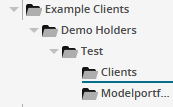
In the Explorer, the following symbols are available:
|
Element |
Symbol |
Description |
|---|---|---|
|
Folders |
|
Folders have no individual symbol, but have the functional arrow symbols allowing you to collapse or expand them. The description of the folders corresponds to the folder name in Infront Portfolio Manager. Below, you find the included groups and securities account filters and possibly also other folders. |
|
Group |
|
The groups correspond to the groups in Infront Portfolio Manager and can contain holders or portfolios as well as subordinate groups and securities account filters with holders or portfolios. |
|
Securities account filter |
|
Securities account filters correspond to the security account filters in Infront Portfolio Manager and can contain holders, prospects, portfolios and also subordinate securities account filters. For more information on creating subfilters in Infront Portfolio Manager, see the online help of Infront Portfolio Manager.
|