
You can archive reports opened in the analysis area (provided you have the corresponding permission). To do this, follow these steps:
-

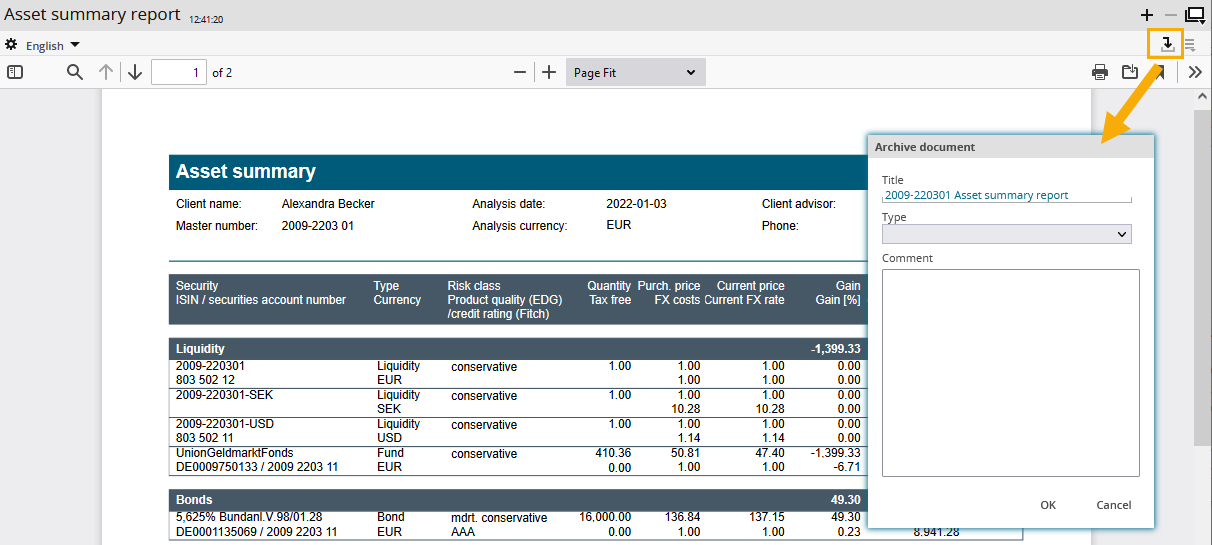
-
In the "Archive document" dialogue window that appears, enter the title, document type and a comment on the report, if necessary.
-
Confirm your entries with "OK".
This archives the report with the selected title in the document archive.
The individual functions in the "Archive document" dialogue window in detail:
|
Element |
Description |
|---|---|
|
Title |
Enter the title for the document that you want to archive.
|
|
Type |
Select the document type. The Server configuration tool let's you exclude document types for client meetings. (However, you can still select them in this list.) This means, that a document can be archived with the "invisible" type and then does not appear in the lists of a client meeting. For more information about the configuration of the Portfolio Manager Server, see chapter Administration in the Help Center for Infront Portfolio Manager.
|
|
Comment |
In this input field, you can enter an explanatory comment. |
A document can be archived only once. After archiving it, the "Archive" icon is no longer available.