
Infront Advisory Solution

Show list of archived documents

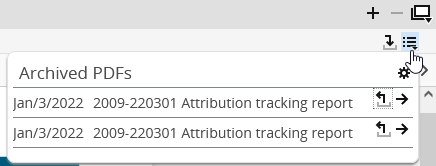
AS_icon_document_archiv_list1_DE.png Use the "Document archive" icon to show the already archived versions of the currently open report in a list. It contains all reports corresponding to the currently visible type and assigned to the currently shown securities account object. For example, in the figure below, you see only versions of the "Attribution tracking" report. You can see this list (and the "Document archive" icon) only with the corresponding permission.

AS_document_archiv_list_EN.png

Functions in the open list of the archived documents.

Element

Description

AS_icon_document_archiv_list2_DE.png

Allows you to define for which period to show the documents.

AS_icon_document_archiv_list3_DE.png

Downloads the corresponding document. Your browser opens the archived document in a new window or tab (depending on your browser and its PDF viewer).

AS_icon_document_archiv_list4_DE.png

Opens a view with the details of the corresponding document including the title, type, user, date and comment.

AS_icon_document_archiv_list3_DE.png In the details, you also find the "Download" icon for loading the document.