

Securities that you add to a sample portfolio are "bought". Thus, a virtual buy order is therefore recorded. You can add to securities in various ways.
-

-
In the search that appears, select the security you want to buy.
-
After selecting the security, define your buy order in the "Add Order" dialogue window that appears.
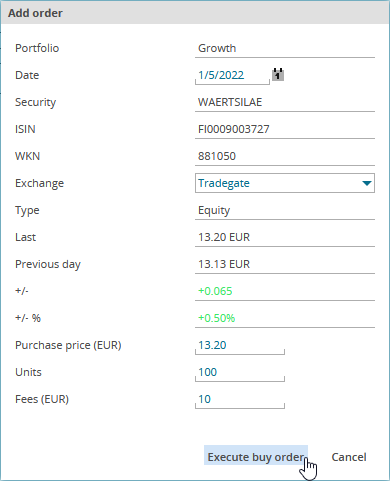
Here, you define the following order data:
Field
Description
Date
Enter the buy date here or select the corresponding date by using the calendar function.
The current date is set by default.
Exchange
Select the trading venue type from the drop-down list.
Purchase price
Enter the buy price time period in the currency specified. The currency is automatically adjusted to the selected location of the quote.
Unit
Enter the quantity you want to buy.
Fees
Enter the fees in the currency specified.
If you defined corresponding settings for the fees of the orders in the "Administration" area, these will be automatically displayed. which you can overwrite.
For more information, see Settings.
The position is added to the model portfolio.
-
Finally, click the "Execute buy order" button.
