

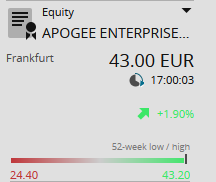
In the security portrait, the profile of the security is displayed under the toolbar of the navigation pane. The following information is shown, if available:
-

-
Security type (here: equity)
-
Security name
-
Current rate and corresponding currency (at the currently selected venue)
-
Price time
-
Change in percent against the previous day's close
-
Trend arrow
-
Visualisation of 52-week high and low
-
Symbol indicating the activation of the price feed:

Real time

Delayed

End of day (for example, for securities created in Infront Portfolio Manager)
-
EDG rating for certificates (if activated)
-
vwd icon (if enabled in the Settings)

-
(Show security portrait)
-
Show chart centre
-
Add to favourites
-
To watchlist
-
To portfolio